Stop copy-pasting from Google Translate.
You know the loop — type, copy, switch apps, paste, realize it sounds robotic, go back, edit, copy again. Nuance is an iOS keyboard, so translation happens inside whatever app you're already in. Pick a tone, send.
Texting in another language right now sucks.
Cross-language messaging means juggling two apps. Worse, the result usually sounds like a textbook wrote it — not like a person speaking to a friend, a professor, or a customer.
Same input. Native-speaker output.
Translation isn't just words — it's tone, register, and context. A literal translator gets the meaning. Nuance gets the message.
Three taps. Inside any app.
Type in your language
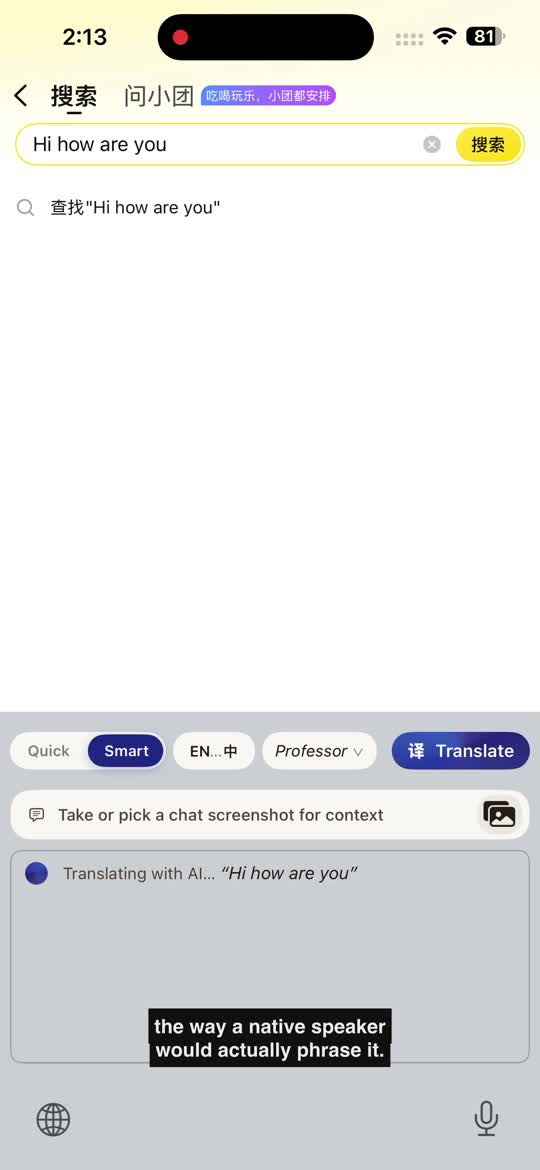
Open WhatsApp, iMessage, WeChat — anything. Type "Hi how are you" naturally.
Switch to Nuance
Long-press the globe key, pick Nuance. The translation strip appears at the top.
Pick a tone, send
Friend, professor, business. Nuance rewrites it the way a native would. Tap to insert.
Private by default. Smart when you want it.
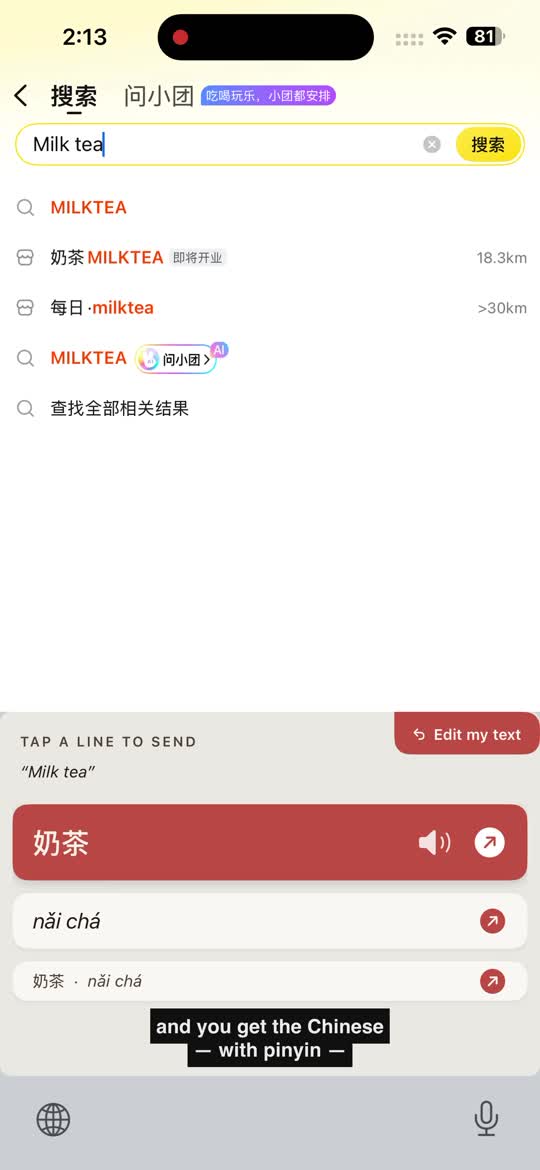
Quick mode
On-device · freeApple's translation framework runs entirely on your phone. No internet, no server, nothing sent anywhere. Works offline once the language pack is downloaded. Best for short messages, signs, menus.
Smart mode
Tone-aware AITone-aware AI translation that adjusts for register, audience, and context. First 10 translations free. Bring your own API key after, or share quick feedback inside the app to unlock more.
The little things that actually matter.
- Reply suggestions — three ways to respond, in their language and yours
- Conversation memory — Nuance remembers names, roles, and the thread you're on
- Voice-to-text dictation — speak instead of type, in either direction
- Pronunciation playback — long-press any translation to hear it spoken aloud
- Pinyin / romanization built in so you can actually say what you sent
- 30+ languages, no account, no sign-in, no email required
Behind Nuance
I built Nuance at Tsinghua, where I send roughly 40 cross-language messages a day. I got tired of flipping to Google Translate, copying, pasting, and watching my professor read something that sounded like a robot wrote it.
Nuance is the keyboard I wanted to exist. If it helps you — or doesn't — I'd love to hear what you'd add. Open the app, tap Settings → Share feedback, and tell me where it sucks.
The honest answers.
Is Nuance really free?
Yes. Quick mode (on-device translation) is free forever. Smart mode (tone-aware AI) is free for the first 10 translations on our bundled key. After that, you can either share a one-minute in-app feedback survey to unlock more, or add your own AI translation provider API key in Settings and pay your own bill directly.
What data does Nuance collect?
Nothing personal. Quick mode runs entirely on your phone — no network traffic at all. Smart mode sends only the text you tap Translate on, over HTTPS, to the AI translation service, which discards it after the response. No accounts, no sign-in, no email. See the full privacy policy.
Which languages are supported?
30+ language pairs via Apple Translation (Quick mode) — Spanish, French, German, Italian, Portuguese, Japanese, Korean, Chinese (Simplified + Traditional), Arabic, Russian, Dutch, Polish, Turkish, Vietnamese, Thai, Indonesian, and more. Smart mode works with any pair the model knows.
Does it work on Android?
iPhone only for now, iOS 18+. Android isn't planned for the near term — building a native iOS keyboard with this UX took the whole runway. If demand is strong, that changes.
What's "Allow Full Access" for, and is it safe?
iOS requires "Allow Full Access" for any keyboard that makes network calls (Smart mode reaches the AI translation service). The toggle is in Settings → General → Keyboard → Keyboards → Nuance. We never log keystrokes — only the text you explicitly tap "Translate" on is sent. Quick mode works without Full Access since it's on-device.
Who's behind Nuance?
One person — Phillip An, a Schwarzman Scholar at Tsinghua University in Beijing. Built solo, designed for the people I send messages to every day in three languages. Feature requests and feedback: open Nuance → Settings → Share feedback.
Translate the way you'd actually say it.
Free, no signup, ready in 60 seconds.
Download on the App Store